
 Patcher
Customization
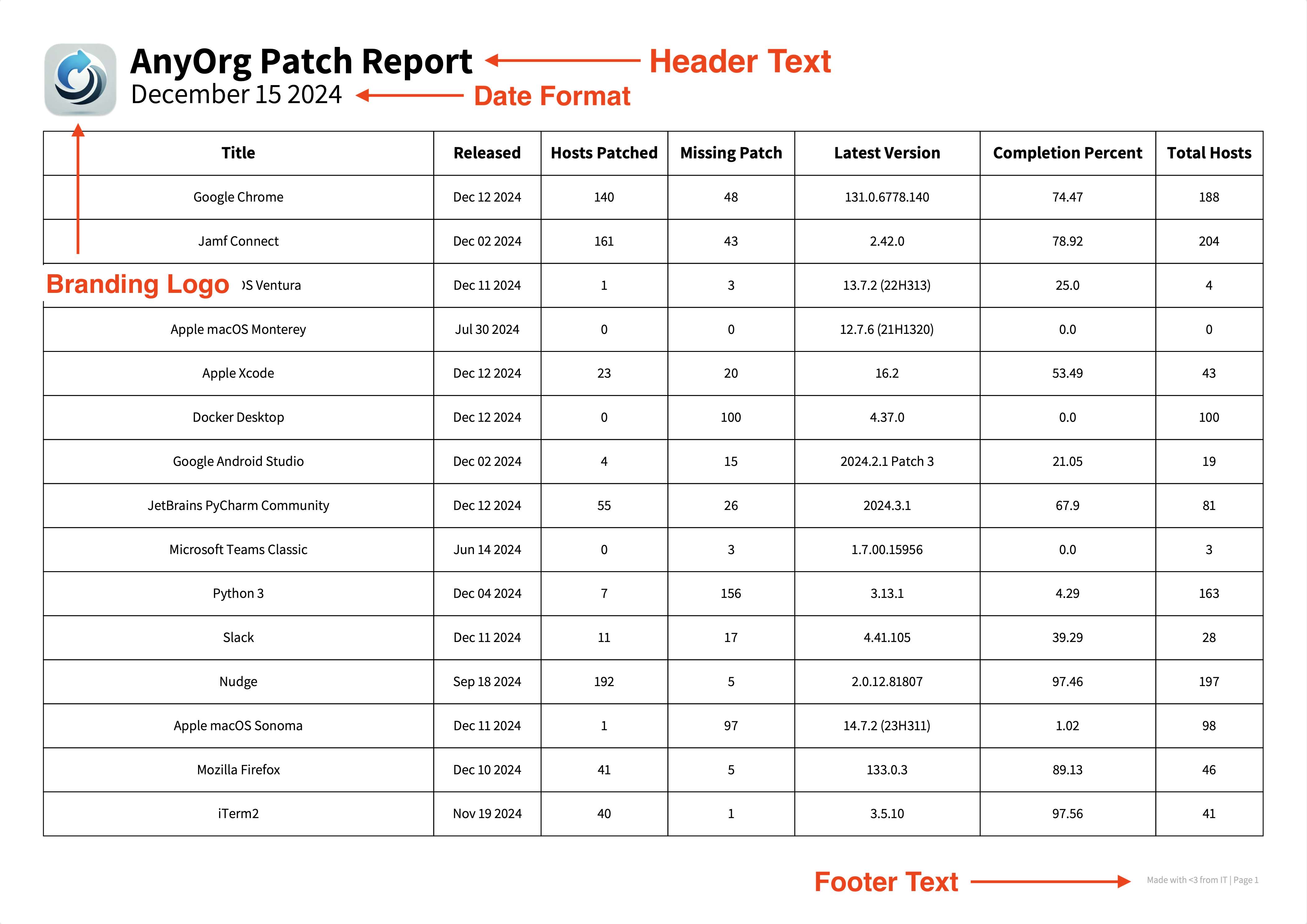
Tailor Patcher’s PDF and HTML reports to match your organization’s branding.
Set the title line and footer credit on every report.
Swap in a custom typeface for the PDF.
Add a company logo and an HTML accent color.
The sample below shows where each element ends up.
Important
UI customization affects PDF and HTML reports only. Excel and JSON exports never read these settings.
How Customization Works
Different methods to get to the same end result. Pick whichever fits your environment.
$ patcherctl reset UI
The wizard prompts for header text, footer text, font choice, logo, and HTML header color. Patcher then writes the result to your property list. Run it once when onboarding, or any time you want to refresh your branding.
$ /usr/libexec/PlistBuddy \
  -c "Set :UserInterfaceSettings:header_text 'AnyOrg Patch Report'" \
  ~/Library/Application\ Support/Patcher/com.liquidzoo.patcher.plist
Best for scripted provisioning where you want to seed Patcher’s branding before any user runs the wizard. For the full plist schema (including non-UI keys), see Property List File.
from patcher import PatcherClient

async with PatcherClient(
    client_id="...",
    client_secret="...",
    server="https://yourorg.jamfcloud.com",
    ui_config={
        "header_text": "AnyOrg Patch Report",
        "footer_text": "Made with <3 from IT",
        "font_name": "Helvetica",
        "reg_font_path": "/path/to/Helvetica-Regular.ttf",
        "bold_font_path": "/path/to/Helvetica-Bold.ttf",
        "logo_path": "/path/to/logo.png",
        "header_color": "#6432bdff",
    },
) as patcher:
    titles = await patcher.fetch_patches()
    await patcher.export(titles, output_dir="~/reports", formats={"pdf"})
Pass values directly to PatcherClient. Values stay in memory for the lifetime of the client, nothing is written to disk, making it the natural fit for CI/CD pipelines, ephemeral runners, or services that need per-tenant branding.
Customizable Elements
Customizing the Font
The PDF font is controlled by a display name, and paths to the regular and bold weighted font files. The default is Google’s Assistant which is bundled with Patcher.
Caution
Custom fonts can introduce alignment or spacing quirks in the PDF. Run a test export after switching to verify everything still lines up the way you expect.
# Font name
$ /usr/libexec/PlistBuddy \
  -c "Set :UserInterfaceSettings:font_name 'Helvetica'" \
  ~/Library/Application\ Support/Patcher/com.liquidzoo.patcher.plist

# Regular font
$ /usr/libexec/PlistBuddy \
  -c "Set :UserInterfaceSettings:reg_font_path '/path/to/Helvetica-Regular.ttf'" \
  ~/Library/Application\ Support/Patcher/com.liquidzoo.patcher.plist

# Bold font
$ /usr/libexec/PlistBuddy \
  -c "Set :UserInterfaceSettings:bold_font_path '/path/to/Helvetica-Bold.ttf'" \
  ~/Library/Application\ Support/Patcher/com.liquidzoo.patcher.plist
ui_config = {
    "font_name": "Helvetica",
    "reg_font_path": "/path/to/Helvetica-Regular.ttf",
    "bold_font_path": "/path/to/Helvetica-Bold.ttf",
}
Customizing the HTML Report Header Color
header_color is the accent color used on the HTML report’s header banner. It accepts a hex string with or without the # prefix, and optionally an alpha channel (#RRGGBBAA). The default is #6432bdff (Patcher purple).
$ /usr/libexec/PlistBuddy \
  -c "Set :UserInterfaceSettings:header_color '#0071bc'" \
  ~/Library/Application\ Support/Patcher/com.liquidzoo.patcher.plist
ui_config = {
    "header_color": "#0071bc",
}
Company Logo
A logo on the PDF report ties branding together. Patcher places the logo in the report header alongside the header text.
Supported Logo Requirements
Validation
Patcher loads the file via Pillow before accepting it, so corrupt or unreadable images are rejected at runtime.
Path requirements
Use an absolute path. The wizard copies the file to ~/Library/Application Support/Patcher/logo.png and stores that path in the plist, so you only need the file to exist long enough for the copy.
Tip
Need to generate a logo file from an existing icon? SAP’s macOS-icon-generator produces standardized PNG icons at the right resolutions. To copy an absolute path from Finder: hold ⌥, right-click the file, and select Copy “filename” as Pathname.
Configuring a Logo
$ patcherctl reset UI
If you provide one, Patcher copies the file to its Application Support directory and writes the resulting path to the plist.
$ /usr/libexec/PlistBuddy \
  -c "Set :UserInterfaceSettings:logo_path '/path/to/logo.png'" \
  ~/Library/Application\ Support/Patcher/com.liquidzoo.patcher.plist
If you set the path manually, copy the logo file somewhere stable yourself. Patcher won’t move it.
ui_config = {
    "logo_path": "/path/to/logo.png",
}
The path is consulted at export time. Make sure the file is readable by whatever process runs Patcher.
Persistence
When you customize via the CLI (wizard or PlistBuddy), values are written to Patcher’s property list and persist across runs. When you customize via the library (ui_config=), values stay in memory for the lifetime of the PatcherClient and disappear when the process exits.
For the full plist schema, the v2 format-change history, and details on every other key Patcher stores there, see Property List File.